
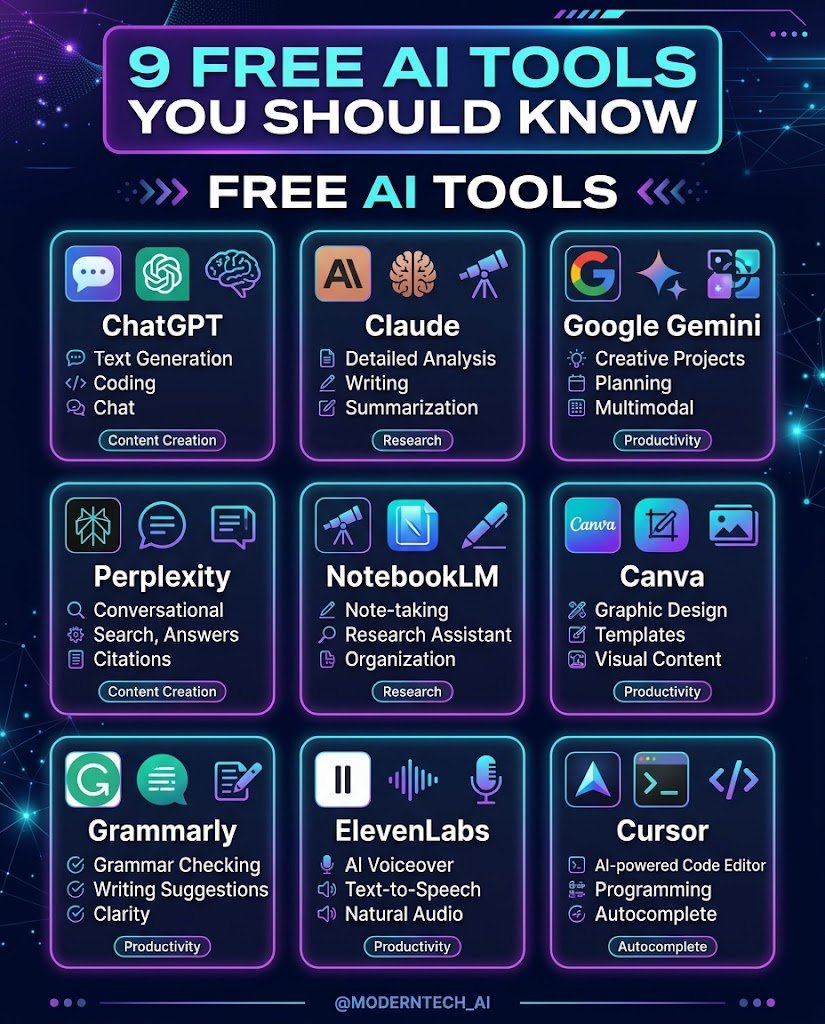

There are hundreds of AI tools out there now, and most “best of” lists just copy each other. This one is shorter. These are the tools that keep showing up in real daily workflows, and I’ve tried to be honest about where each one is strong and where it falls short.
A quick note before we start: free plans change often. Features and limits that exist today may shrink or grow, so check each tool’s pricing page before you commit your workflow to it.
1. ChatGPT
The one most people try first. It’s a solid all-rounder for drafting emails, brainstorming, summarizing long text and explaining things in plain language.
Good for: general writing help, quick questions, idea generation.
Watch out for: it can state wrong facts with total confidence, so double-check anything important.
2. Claude
Claude is strong with long documents and careful, natural-sounding writing. If you paste in a big report and ask for a summary or a rewrite, it handles that well.
Good for: long-form writing, editing, analyzing documents, coding help.
Watch out for: free usage limits can run out during heavy sessions.
3. Google Gemini
Useful if you already live in Google’s world (Gmail, Docs, Drive). It plugs in nicely there, and it’s handy for quick research and image-related questions.
Good for: people already using Google apps, quick lookups.
Watch out for: answers on niche topics can be shallow, so verify the details.
4. Perplexity
Think of it as a search engine that gives you an answer with sources attached. When you want to know where a claim came from, this is more useful than a plain chatbot.
Good for: research, fact-finding, comparing products or topics.
Watch out for: always click through the sources. Summaries sometimes miss nuance.
5. NotebookLM
You upload your own material (PDFs, notes, links) and ask questions about only that. It’s great for studying or digging through reports, because answers stay tied to what you gave it.
Good for: students, researchers, anyone buried in documents.
Watch out for: it only knows what you feed it, so it won’t fill gaps on its own.
6. Canva (Magic tools)
Canva’s built-in AI features help with quick designs, resizing, background removal and simple image edits. You don’t need design skills to get something presentable.
Good for: social media posts, thumbnails, simple presentations.
Watch out for: some of the best AI features sit behind the paid plan.
7. Grammarly
Not new, but still useful. It catches awkward phrasing, grammar slips and tone problems as you type, which is great for emails and professional writing.
Good for: polishing text, non-native English writers.
Watch out for: the free version only covers the basics, and over-accepting suggestions can make your writing feel flat.
8. ElevenLabs
If you need realistic voice-overs for videos or podcasts, this is one of the most natural-sounding options available. The free tier is enough to test it.
Good for: narration, short video voice-overs, accessibility.
Watch out for: free credits go quickly, and you should only clone or use voices you have rights to.
9. Cursor / GitHub Copilot (for coding)
If you write code, an AI assistant inside your editor saves a lot of boring typing. It suggests lines, explains errors and helps you move faster on repetitive work.
Good for: developers and learners writing code daily.
Watch out for: don’t paste code you don’t understand. Read what it gives you before you ship it.
How to Pick the Right One
You don’t need all nine. A simple way to decide:
- Mostly writing? Start with Claude or ChatGPT, plus Grammarly.
- Mostly research or studying? Perplexity and NotebookLM.
- Making content? Canva and ElevenLabs.
- Coding? An editor-based assistant.
Pick one or two, use them for a week on real work, and keep only what actually saves you time.
Final Thoughts
AI tools are helpful, but they’re assistants, not replacements for your own judgment. Use them to speed up the boring parts, and keep a human eye on facts, tone and quality.
Which of these do you use already? Tell us in the comments, and we’ll cover the ones you want to see next.

Leave a Reply