
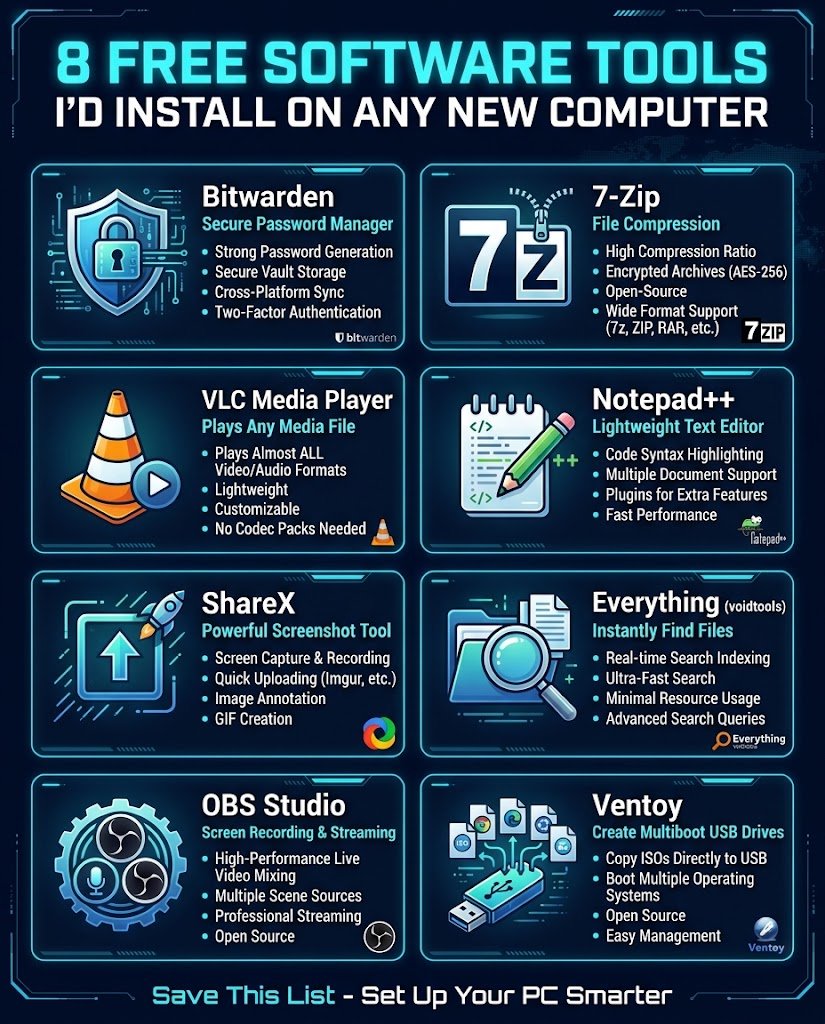

Every time I set up a fresh computer, I end up installing the same handful of programs. Not because they’re trendy, but because I got tired of living without them. Here’s the list, with a short note on why each one earned its spot.
All of these are free. A couple have paid upgrades, but you won’t need them to get the main benefit.
1. Bitwarden
A password manager that works on your phone, browser and desktop. If you’re still reusing one password across sites, this is the fix. Let it generate long random passwords and stop trying to remember them.
It’s open source, which is a nice bonus when you’re trusting something with your logins.
2. 7-Zip
Windows can open zip files, but it chokes on a lot of other formats. 7-Zip handles RAR, 7z, tar and plenty more, and it’s light enough that you’ll forget it’s there. Install it once and never think about archives again.
3. VLC Media Player
It plays nearly any video or audio file you throw at it, without hunting for codecs. Weird old file from a phone five years ago? VLC opens it. It can also convert files and play streams if you ever need that.
4. Notepad++
If you ever edit config files, scripts, or even just messy text, the default Notepad gets annoying fast. Notepad++ gives you tabs, syntax highlighting and a proper search-and-replace. It’s Windows only, so Mac users can look at VS Code or BBEdit instead.
5. ShareX
Screenshots done properly. You can capture a region, a window or a scrolling page, then annotate and save or upload it in one go. Bloggers and anyone writing tutorials will use this constantly. Fair warning: the settings screen looks intimidating at first, but the defaults work fine.
6. Everything (by voidtools)
Windows search is slow and often misses things. Everything indexes your files by name almost instantly, so you type a few letters and the file appears. It only searches filenames, not contents, but for finding stuff quickly it’s hard to beat.
7. OBS Studio
Mostly known for streaming, but it’s also the easiest free way to record your screen. Good for tutorials, bug reports, or showing a friend how to do something. It takes a little setup the first time, then it’s smooth.
8. Ventoy
Handy when you need a bootable USB drive. Instead of re-flashing the drive for every operating system, you copy ISO files onto it and pick from a menu at boot. If you ever reinstall Windows or try Linux, you’ll be glad you have it.
A Few Things Worth Saying
Download these from the official sites, not from random “free software” pages. That’s how most people end up with bundled junk. And if a tool isn’t useful to you, skip it. A clean computer with five good tools beats one stuffed with twenty you never open.
Quick Recap
| Tool | What it’s for |
|---|---|
| Bitwarden | Passwords |
| 7-Zip | Zip, RAR and other archives |
| VLC | Video and audio playback |
| Notepad++ | Text and code editing |
| ShareX | Screenshots |
| Everything | Fast file search |
| OBS Studio | Screen recording |
| Ventoy | Bootable USB drives |
What’s the first thing you install on a new machine? Drop it in the comments. If it’s good, it might make the next list.

Leave a Reply